
White-Label OTT Platform: How It Works and When to Build One
A white-label OTT platform gets you to market in weeks, not months. Here’s how it works, what to look for, and when it’s the right call.

Ivana Pavlova Angjeleska, QA Lead
11/03/2026 • 10 min read
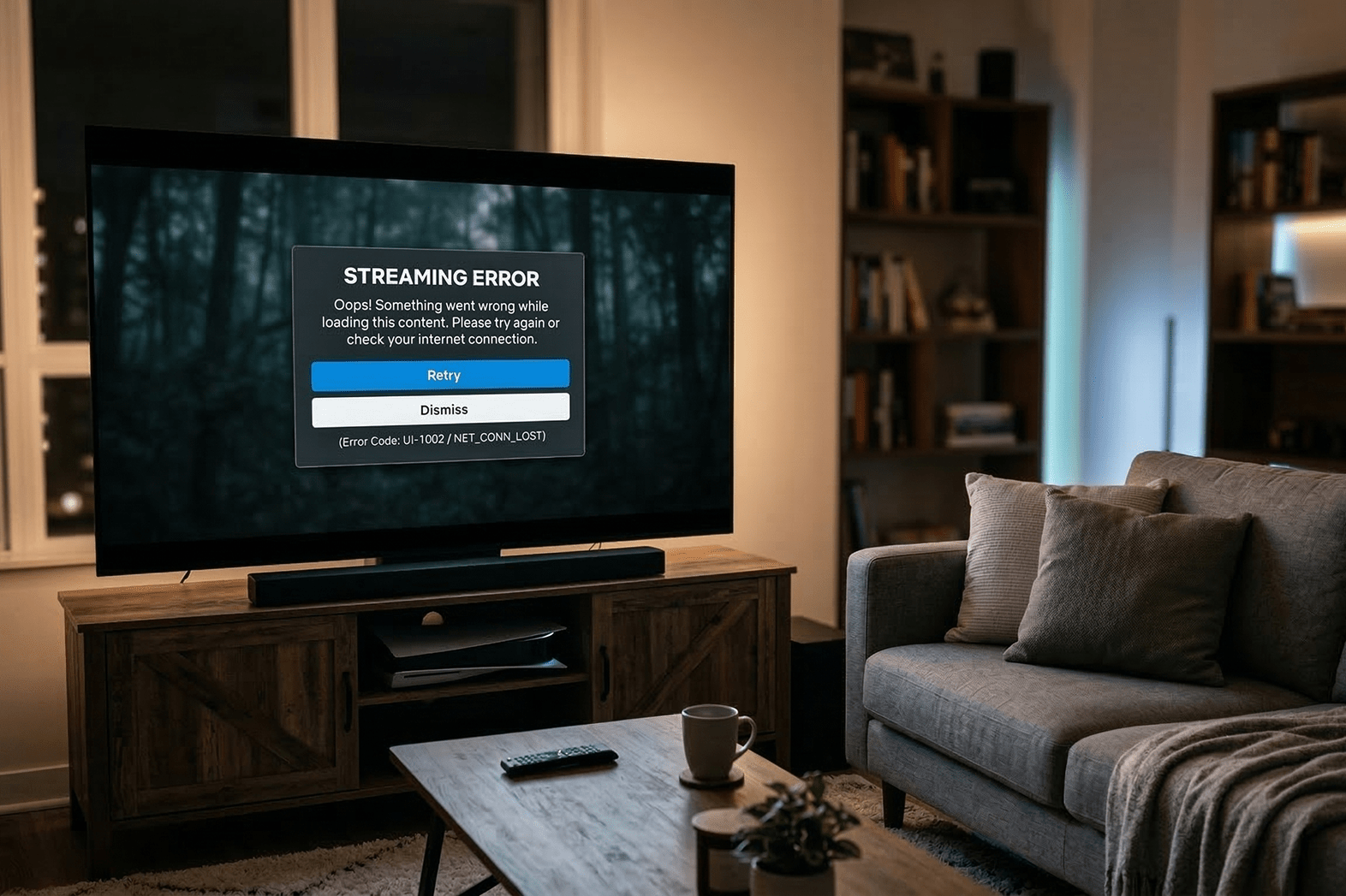
Most streaming app crashes on matchday aren’t code bugs. The code is fine. The tests all pass. But a content editor published a hero banner with a missing image, or a scheduled promotion expired and left a broken deep link pointing at removed content, and now 200K fans are staring at an error screen.
We’ve seen this pattern across enough streaming platforms to call it a rule:
By the time an organization has solid code QA in place, content QA is still running on prayer and manual spot-checks.
And no amount of process fixes a structural problem.
The classic testing pyramid – many unit tests at the base, fewer integration tests in the middle, a handful of E2E tests at the top – was designed for applications where the UI is determined by code. Deploy new code, test against it.
CMS-driven apps don’t work that way.
Your homepage layout is a JSON payload assembled server-side from whatever an editor published this morning. The hero rail that existed yesterday might be gone, replaced, or pointing at a piece of content that was depublished overnight. The test you wrote last sprint – the one asserting that “Trending Now” appears at position three – fails the moment editorial renames it “What’s Hot.” No code changed. The test just stopped being valid.
Netflix’s homepage looks different for every user, on every session. Disney+ manages five branded content hubs, all CMS-driven, updating continuously around every major release. The BBC validates programme metadata – synopses, images, availability windows, age ratings – across 1,500+ device variants. Netflix, Disney+, the BBC – this is the standard operating environment for any serious streaming platform.
At that scale, tests written against static content assumptions will pass on Tuesday and fail on Wednesday when editorial renames a rail.
The suite looks green. The app is broken.
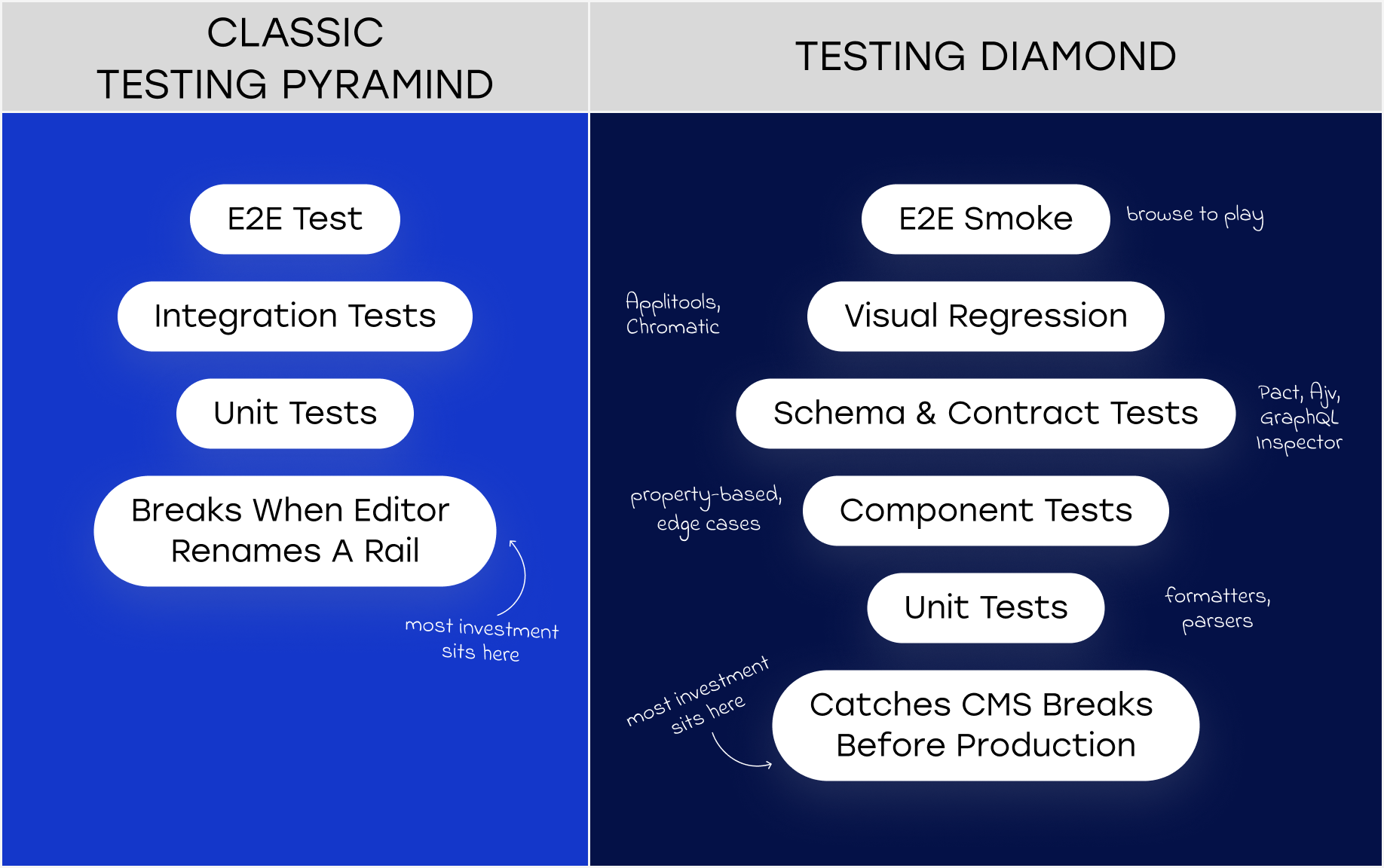
The model the industry’s best-run platforms are converging on looks different from the pyramid. We’ve taken to calling it the Testing Diamond and the key difference is where the heaviest investment sits.
Instead of putting most effort into unit tests at the base, the diamond places the thickest layer at the contract and schema validation level. Unit tests still exist at the bottom. E2E smoke tests still exist at the top. But the real quality work happens in the middle, validating the contract between your app and your CMS before a single pixel renders.
The layers, from base to tip:
The inversion reflects a reality the best streaming teams have learned the hard way: in a CMS-driven app, a broken contract between your app and your CMS causes more production incidents than broken code. Test accordingly.
Contract testing in this context is different from the microservice version most backend engineers are familiar with.
Your CMS isn’t a deterministic API. An editor with publishing rights is the “provider,” and they don’t run tests before hitting publish. The contract needs to be defined at the content model level: what fields are required, what types they must be, what constraints apply. A hero slot must have a background image. A carousel must have between 3 and 12 items. An episode content type must have a season number.
Tools like Pact let you define these contracts as the consumer (your app) and verify them against the provider (your CMS API or BFF layer) in CI. Pact’s provider states are the critical mechanism: you define “homepage with a hero banner featuring a live event” as a named state, and the provider sets up the corresponding content before verification runs. When editorial extends the content model and adds a required field your app doesn’t handle, the contract test fails before the change ships to production.
For GraphQL-based CMS setups, GraphQL Inspector detects breaking schema changes between versions. In federated architectures – common when your platform has separate subgraphs for CMS content, playback, user entitlement, and EPG – Rover CLI validates that subgraph changes don’t break the composed supergraph.
The honest assessment: setting this up properly takes time. The Pact ecosystem has a learning curve, and writing useful provider states requires close collaboration between QA engineers and the teams who build and maintain content models.
"But the alternative is finding contract breaks in production, during a live event, at the worst possible moment."
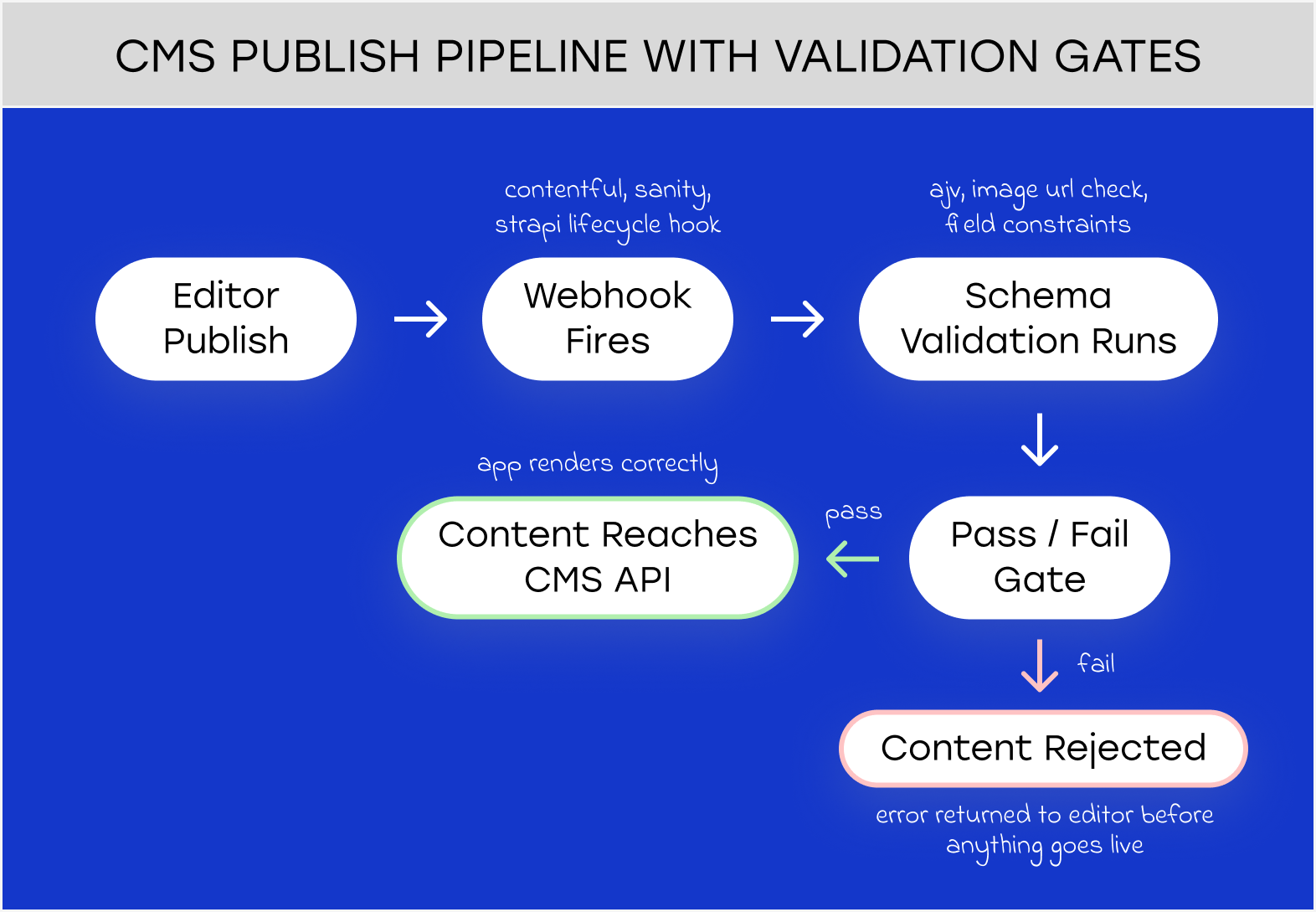
Contract testing catches problems at deployment. Schema validation — the other half of solid CMS testing — catches them earlier, at publish time.
Most headless CMS platforms have native validation hooks. Contentful fires webhooks on Entry.publish events that can trigger external validation before content goes live. Sanity supports document-level validation rules with async cross-field checks. Strapi, which underpins our Velvet platform, has lifecycle hooks that run custom logic on beforeCreate and beforeUpdate, you can reject a content entry that fails business rules before it ever reaches the API.
The validation layer should cover the things that your content model can’t enforce on its own. It’s straightforward to require that an image field isn’t empty. It’s harder to encode “the image must be at least 1280×720 and not a 404 URL” in the CMS UI. External validation via webhook handles the second case.
The edge cases worth building explicit tests for: missing thumbnails (test null, empty string, invalid URL, and 404), titles at boundary lengths (short enough to look odd, long enough to break layout – test 3 chars, 50, 100, 200, 500), empty carousels (should disappear entirely, not render as orphaned whitespace), and RTL text if you have Arabic or Hebrew audiences.
There’s an 80/20 to this: the majority of content bugs trace back to schema design decisions, not necessarily editorial mistakes. A content model that makes it possible to publish a hero banner without an image will eventually produce a hero banner without an image. Fix the model before you try to test around it.
Visual regression testing has a reputation for being brittle on CMS-driven apps. That reputation is mostly deserved if you’re using it wrong.
The mistake is running visual regression testing against live content. Screenshots will differ on every run, because content changes constantly. The approach worth trying is running it against mocked CMS responses: deterministic fixtures representing the full range of data shapes your components should handle.
Applitools Eyes with Layout Match mode is worth the cost for this use case. It validates that the structural layout is correct while accepting content variation. It understands that a different title in the hero banner isn’t a regression, a misaligned CTA button is. The Ultrafast Grid renders across 100+ browser and device combinations in parallel; the turnaround is fast enough to fit in CI without adding painful delays.
Chromatic, built on Storybook, is the right tool for the component layer: test each CMS-driven component in isolation with the full set of content fixtures. It’s cheaper than Applitools, faster to set up, and catches the most common class of visual bugs – the ones that only appear with edge-case data. It doesn’t replace page-level integration testing, but it covers the component surface efficiently.
One layer where the standard tooling genuinely struggles: Connected TV apps built on Lightning.js. The framework renders to WebGL Canvas, not DOM. Percy, Chromatic, and most DOM-based testing tools see nothing. Screenshot-based testing still works, but you lose accessibility tree inspection and component-level granularity. If your CTV app runs on Lightning.js, this is a real constraint, and it’s worth factoring into your tooling decisions before you’re committed to the platform.
This is the question most engineering leaders haven’t answered yet.
When a developer ships a code bug, there’s a clear ownership chain: the engineer wrote it, QA caught it (or didn’t), and there’s a release process that governs what reaches production. When a content editor publishes a configuration that breaks the homepage, none of that chain applies. The content changed, no release happened, and nobody in the engineering workflow saw it.
The teams running content QA well treat it as a platform problem. Validation is automated into the CMS publish pipeline: constraints enforced at the source, before anything reaches production. A content staging environment mirrors production for visual regression runs. And there’s a dashboard: broken image rates, content API error rates, rendering failure spikes, with alerts configured to fire before users notice.
The Spotify model is worth borrowing: control rendering logic server-side, validate and filter before content reaches any client. If your architecture allows it, the CMS should never be able to serve your app a response that it can’t render gracefully.
If your architecture doesn’t allow it today, the practical starting point is a pre-publish webhook that runs JSON Schema validation and image URL checks, combined with a content health dashboard that makes broken content visible to the team that can fix it.
The challenges compound on CTV. Most mobile streaming testing infrastructure doesn’t translate.
Roku’s test tooling is immature by mobile standards – a known friction point for teams building Roku apps at scale. Build-deploy-test cycles run 30 to 60 seconds. The device lab required to cover meaningful CTV market share (Roku Express and 4K Stick, Fire TV Stick Lite and 4K Max, Apple TV 4K, Samsung Tizen, LG webOS, Android TV) costs $2K to $5K in hardware before you’ve run a single test. Cloud CTV device labs are sparse: AWS Device Farm supports Fire TV only.
Suitest is the only dedicated CTV automation platform with multi-platform support, and it’s newer. Most organizations are still doing CTV testing against a physical device lab, which is fine for manual testing and acceptable for automated runs, but it requires someone to own the lab, maintain the devices, and keep them connected.
The deeper issue is that CTV apps have unique content failure modes that mobile testing misses entirely. EPG data validation covers time accuracy, channel-to-stream URL mapping, schedule continuity, and gap-free timezone transitions; and it’s almost entirely custom-built at every streaming company. No off-the-shelf EPG testing solution exists. Deep link format validation differs per platform: Roku, Fire TV, Apple TV, Tizen, and webOS all handle deep links differently, and a broken deep link from the CMS lands on a dead end that’s hard to track without platform-specific automation.
Engineering quality assurance for CTV is infrastructure-intensive and fragile in ways that mobile isn’t. Build the contract layer first. It catches the majority of CTV content bugs without requiring a device.
Not all of this needs to be built at once.
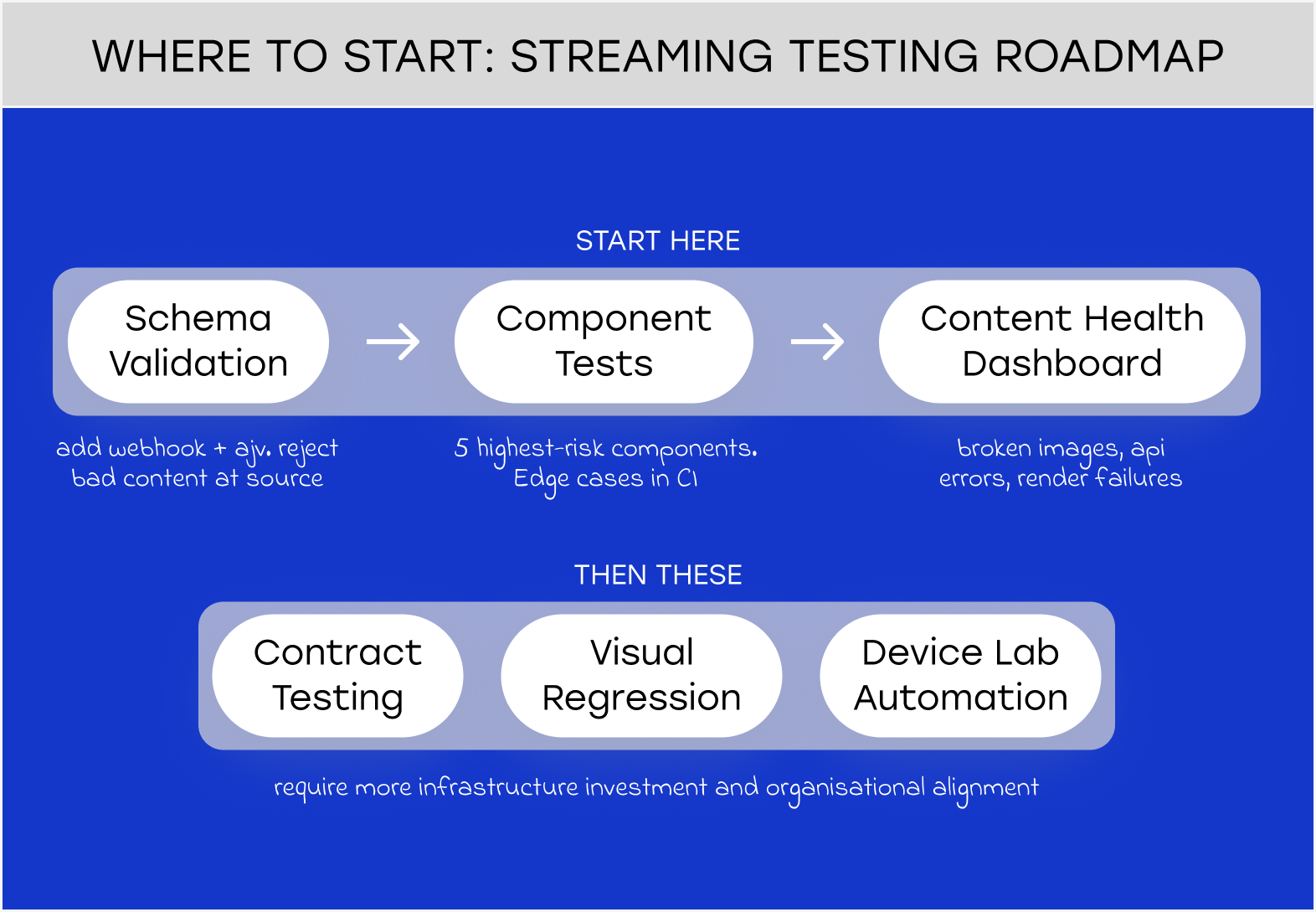
If you’re starting from scratch, the order matters. First: schema validation at publish time. It’s the highest-leverage intervention with the lowest infrastructure cost – add a webhook, define your schemas with ajv, start rejecting malformed content before it reaches production.
Second: component tests with varied content fixtures. Pick the five components that cause the most production incidents, write tests that exercise the edge cases (missing data, extreme lengths, empty collections), and run them in CI.
Third: a content health dashboard. Broken image rate, content API error rate, rendering failure spikes. You can’t fix what you can’t see.
Contract testing, visual regression, and device-lab automation come after. They’re valuable, but they require more infrastructure investment and more organizational alignment to do well.
The test for whether your streaming testing program is mature enough: if a content editor publishes a broken hero banner at 3 AM, will you know before a fan does?
If the answer is no, the pyramid isn’t the problem. It’s what you’re using it to test.
The testing pyramid was designed for applications where the UI is determined by code. For streaming apps powered by a headless CMS, it’s the wrong model. Content changes constantly (without a code release) and a test suite built on static content assumptions will break or give false confidence the moment editorial publishes something unexpected. The Testing Diamond inverts the priority, placing schema and contract validation at the centre rather than unit tests at the base.
Pact is a consumer-driven contract testing tool that defines what your streaming app expects from its CMS or API, then verifies that the provider meets those expectations in CI. Instead of E2E tests that depend on live content, Pact tests run against defined provider states – deterministic scenarios like “homepage with a live event hero banner.” When a CMS content model changes in a way the app can’t handle, the Pact test fails before the change reaches production.
A white-label OTT platform gets you to market in weeks, not months. Here’s how it works, what to look for, and when it’s the right call.
Next.js vs React for streaming platforms: which wins on SEO, load speed, and scale? Here’s the framework we use after 180+ OTT builds.

The hero banner had no image. 200K fans saw an error screen. This is the streaming testing model that prevents it.
We’ve built 180+ streaming apps across mobile and Connected TV, including a gaming streaming platform that needed to survive extreme live event traffic. QA architecture for CMS-driven platforms is something we think about a lot right now. If you’re working through the same questions, we’re happy to compare notes.